Reimbursements · Transactions

Recover every dollar Amazon owes you back

Amazon loses, damages and miscredits inventory all the time. SellerGuards pulls every reimbursement event — cash or replacement units — and shows the real money you got back, the COGS it covers, and the reason behind each one.

ReimbursementsCash · InventoryProfit impact+$85.97Amount recovered$557.59COGS covered$502.17ITEMC / IAMOUNTCOGSIMPACTInstant Pot DuoInbound lost · inventory0 / 3$0.00$53.99+$18.00Sony WH-1000XM4Carrier damage · cash1 / 0$278.40$208.80+$29.99Apple AirPods ProCustomer return · cash1 / 0$199.20$149.40+$10.50
The reimbursement list

Every reimbursement, and what it gave you back

Reimbursement events sync automatically from Amazon. Each row shows whether you were paid in cash or replacement inventory, the amount, the COGS it covers, the net profit impact, and the reason — so you can confirm Amazon actually made you whole.
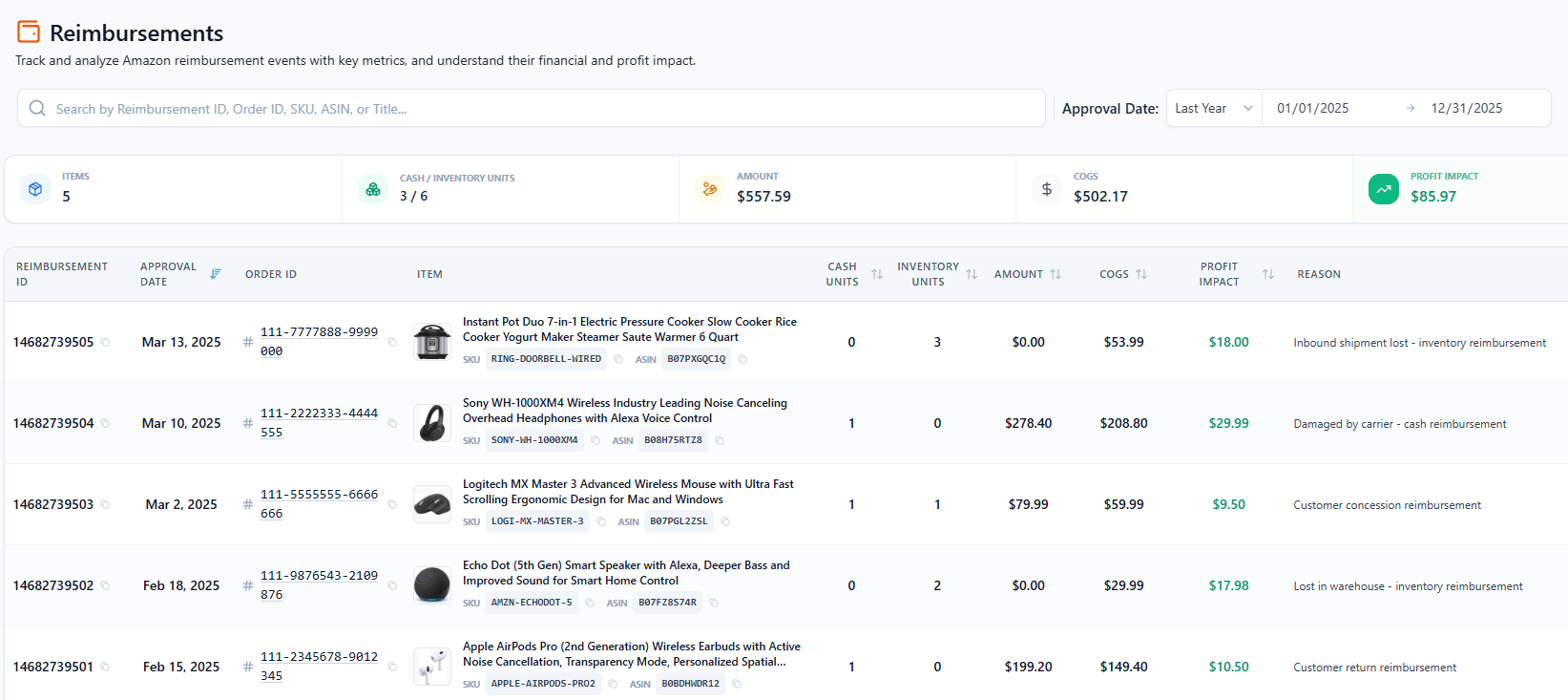
SellerGuards Reimbursements list showing cash and inventory units, amount, COGS, profit impact and reason per reimbursement event

Cash vs. inventory. See whether Amazon paid you back in cash or returned units to your stock — with the cash and inventory unit counts side by side.

Profit impact on every line. Amount, the COGS it covers, and the net profit impact — calculated per reimbursement, right in the list.

The reason behind each one. Lost inbound, damaged by carrier, customer concession and more — so you know exactly why Amazon owed you.

Totals at the top. Summary cards roll up items, cash/inventory units, amount, COGS and total profit impact for whatever date range you're viewing.

The gap most sellers miss

Reimbursed is not the same as made whole

When Amazon loses or damages a unit it reimburses you at its estimate of the item's value — usually derived from your recent selling price, less the fees it would have charged. That number has no relationship to what the unit actually cost you.

Most of the time it lands close enough that nobody looks. Sometimes it does not: a unit bought on a promotion, a product whose price you have since cut, or a case where Amazon values a multipack as a single. The reimbursement shows up as money in, the P&L looks fine, and the shortfall is invisible unless something compares the payment against your real landed cost.

Amount

What Amazon actually paid, per event.

COGS covered

What those units cost you, taken from the FIFO lot they came from.

Profit impact

The difference — the number that tells you whether the reimbursement was adequate.

Because SellerGuards already carries your purchase lots for P&L, it can put those three figures on the same row. A reimbursement that pays less than the stock cost is not a recovery; it is a smaller loss, and it should be read that way.

Two kinds of reimbursement

Cash and replacement units are not interchangeable

Amazon settles a claim one of two ways, and they behave completely differently in your accounts.

Paid in cash

Money lands in your settlement. Revenue you did not sell for, against stock you no longer have. It closes the loss but the unit is gone from inventory.

Replaced in kind

Amazon returns units to your available stock instead of paying. No cash arrives, and the units come back with their original cost attached — so they still have to sell before the money is real.

Treating an inventory reimbursement as recovered cash overstates a month; treating a cash reimbursement as ordinary revenue understates how much stock you have lost. The list shows cash and inventory unit counts side by side on every row so the two never get added together.

What Amazon owes for

Six categories, one 60-day window

Reimbursements fall into six recognised categories. Each has its own report in Seller Central and its own evidence requirements, and claims generally have to be raised within 60 days of the event — after which the money is simply gone. Unreturned customer refunds are the exception that catches people: that window does not open until roughly day 60 and runs to about day 120, so a claim filed too early is denied. Both windows are set out here.

Lost FBA inventory

Units that entered a fulfillment center and cannot be accounted for.

Damaged inventory

Damaged by Amazon or its carrier while in their custody.

Customer returns not checked in

A refund was issued but the unit never came back to your stock.

FBA fee overcharges

Wrong size tier or weight applied, so every unit was overcharged.

Inbound shipment discrepancies

Amazon received fewer units than you sent and can be shown to have.

Chargebacks and shortages

Adjustments applied in error, or contested shortage claims.

Each one is worked through — where to find it, what evidence Amazon accepts, and how the payout is calculated — in the FBA reimbursements guide. Fee overcharges in particular are worth checking against the current fulfillment rate card, since a mis-measured unit overcharges quietly on every single shipment.

Being straight about scope

This tracks reimbursements. It does not file them.

Worth stating plainly, because the two get conflated. Recovery agencies audit your account, file claims on your behalf and take a cut — typically 15–25% of whatever they recover, sometimes a flat monthly fee. SellerGuards is not that. It shows you every reimbursement Amazon has already made and whether it covered what the stock cost you.

What it does today

Syncs every reimbursement event, splits cash from replacement units, matches each to its FIFO cost, and shows the profit impact and reason per row.

What it does not do

It does not scan for unclaimed discrepancies or file claims for you. Automatically surfacing lost, damaged and overcharged units — and filing them — is in development.

In the meantime the claims are yours to file, free, and the reports you need are already in Seller Central. The guide walks through the process for each category. Filing yourself and keeping 100% is almost always better economics than a commission, provided you actually do it inside the 60 days.

Frequently asked questions

Does SellerGuards file Amazon reimbursement claims for me?

No. It tracks the reimbursements Amazon has already made and shows whether each one covered your real cost. Automatically surfacing lost, damaged and overcharged units and filing the claims is in development. Until then the claims are yours to file, which also means you keep 100% of what you recover.

What is the difference between a reimbursement tool and a reimbursement service?

A service audits your account and files claims for you, charging a commission on what it recovers — typically 15 to 25 percent, or a flat monthly fee. A tracking tool shows you what came back and whether it was enough. If you are willing to file your own claims inside the 60-day window, filing yourself and keeping the full amount is usually better economics.

Does an Amazon reimbursement cover my full cost?

Not necessarily. Amazon reimburses at its own estimate of the item's value, generally derived from recent selling price less the fees it would have charged — not from what you paid for the unit. On promotional buys, discontinued lines or products whose price you have since cut, the payment can land below your landed cost. The only way to know is to compare each reimbursement against the FIFO cost of the units it covers.

Is it better to be reimbursed in cash or replacement inventory?

They are not equivalent. Cash closes the loss immediately but the unit is gone. Replacement units return to your available stock carrying their original cost, so they still have to sell before the money is real — and they start ageing toward the storage surcharge again from the moment they land. Cash is usually cleaner unless the product is selling well and hard to restock.

How long do I have to claim an Amazon reimbursement?

Generally 60 days from the event, though the exact window varies by category. It is the single most common reason claims go unpaid: the discrepancy is real, the evidence exists, and nobody looked in time. Reviewing reports monthly rather than quarterly is usually enough to stay inside it.

Where do I check my Amazon reimbursements?

In Seller Central, under the FBA inventory reports — the reimbursements report lists what has been paid, and the inventory adjustments and inbound reconciliation reports show discrepancies that may still be claimable. SellerGuards pulls the reimbursement events in automatically and prices them against your cost, so the check is a comparison rather than a reconstruction.

See every dollar Amazon paid you back

Connect your Amazon account and SellerGuards turns your reimbursement history into a clear, per-event record of what you recovered — automatically.

Start Free View Live Demo